טלפון

03-617-6888

רחוב כנרת 15, בני-ברק
5120260 ישראל

CALL US

972-3-6176888

15Kineret st,Beni-Brak

5120260 Israel

CV380-CS

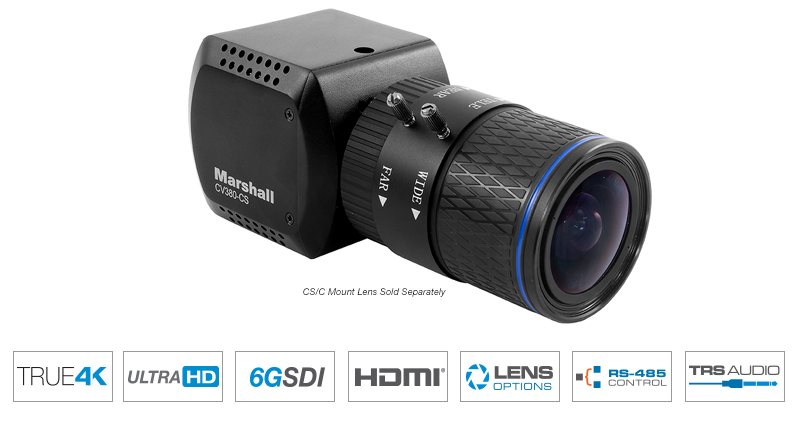
Marshall CV380-CS

Compact 4K30 Camera (6GSDI & HDMI)

CV380 - Compact 4K30 Camera (6GSDI & HDMI)

  • 6G-SDI (single BNC) & HDMI 1.4 outputs
  • 8.5 Megapixel (1/2.5") sensor (4:2:2)
  • CS/C-mount for Varifocal or Fixed lenses
  • True-4K: 4096 x 2160p @ 30, 29.97, 25, 24, 23.98 fps
  • Ultra-HD: 3840 x 2160p @ 30, 29.97, 25, 24, 23.98 fps
  • HD (Progressive): 1080p / 720p @ 60, 59.94, 50, 30, 29.97, 25, 24, 23.98 fps
  • HD (Interlaced): 1920 x 1080i @ 60, 59.94, 50 fps
  • Color Matrix function: Style, Master Level, Master Phase, Color Level, Color Phase
  • TRS stereo audio inputs (mic & line level)
  • Audio Line input does not provide power to the audio device. Mic will use Mic Bias 1.7V and up to 3mA max current
  • Remote adjust and match through RS485 (Visca) or OSD menu joystick
  • Wide range of broadcast picture adjustment settings
  • 12v power supply, can operate 12V+/-10% with a 6 watt draw

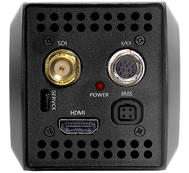
CV380 4K30 rear connectionsRear view of CV380-CS

The Marshall CV380-CS is a compact, true 4K camera built around an 8.5-Megapixel, 1/2.5-inch sensor that delivers ultra-crisp, clear true 4K resolution in 4096x2160p. The CV380-CS contains a single 6G (BNC) output with 6G/3G/HD-SDI capability and a simultaneous HDMI output. The flexible CS/C lens mount offers a wide variety of lens options with DC Auto-Iris plug-in ability.

The CV380-CS is a versatile and powerful camera solution in an easy-to-understand design. Remote adjust and match control is delivered via RS485 (Visca) or OSD menu joystick on breakout-cable. A wide range of picture adjustment settings are available such as paint (red/blue), white balance, gain control, pedestal (blacks), exposure, gamma, and more. The CV380-CS delivers ultra-clear 4K or UHD video while maintaining a discrete presence. Use it to capture wide 4096×2160 (4K) video and pull HD frames in post, or as a flexibility spill-over shot, or for unique points-of-view and more.
CV380-CS Applications:

Broadcast Sports, Broadcast Television, Broadcast News, House of Worship, Courtroom, Government Assembly, Live Music & Events, Studio Production, Remote Learning, ProVideo, Broadcast Production, Cinematic Production

Camera Control Application

  1. Download Camera Control Software HERE
  2. Use USB to RS485/RS422 Converter (CV-USB-RS485)
  3. Use cat5 or 24AWG twisted-pair wire (sold separately)
  4. Connect cable from RS485(+) terminal on Camera to T/R (+) on USB/RS485 converter
  5. Connect cable from RS485(-) terminal on Camera to T/R (-) on USB/RS485 converter
  6. Plug USB cable from USB/RS485 converter into USB port on Laptop or Computer (note ComPort#)
  7. Open up CamControl Program and match Serial Port to corresponding ComPort# used
  8. Select Baudrate in CamControl Program and match it in Camera OSD Menu under DISPLAY CONTROL > BAUDRATE
  9. Select Camera Address in CamControl Program and match it in Camera OSD Menu under DISPLAY CONTROL > CAM ID
  10. Select Open in CamControl Program
  11. Test connection by pushing MENU in lower right of CamControl Program – OSD Menu should come up on video signal
  12. Commands can also be sent without using OSD Menu

For an attractive quote and to order the product

Call : 972-3-6176888

Message Us